START WITH 15M
Confirm direction and location
Read the current bias, 1-hour background and whether price is in the upper, middle or lower part of the relevant range.
 韬光软件TAOGUANG 中文Telegram
XAUUSD · TRADINGVIEW · 15M / 3M
Taoguang organizes multi-timeframe XAUUSD analysis into a clear reading order. Understand the higher-timeframe context first, then check whether the short-term structure agrees.
Historical charts demonstrate the software layout and reading method only. They are not current market analysis, advice or a promise of future results.
English interface readyBoth the 15-minute and 3-minute dashboards are available in English
TradingView invite accessAuthorization is tied to one public TradingView username
International access coming soonUSD payment and public overseas subscriptions are not open yet
HOW TO READ · FIRST VIEW
The charts are not competing and their signals do not need to appear on the same candle. Read the broad context first, the short-term condition second, and chart markers last.
Read the current bias, 1-hour background and whether price is in the upper, middle or lower part of the relevant range.
Check alignment, pullback recovery, continuation, volume condition and fast/slow line behavior without forcing synchronization.
They are observation prompts, not entry instructions. Your own process and risk limits still govern every decision.
123No. Each timeframe calculates independently. The 15-minute view provides context while the 3-minute view keeps its own rhythm.
No. Low range, conflicting direction or unclear structure can make waiting the more disciplined response.
WHO IT IS FOR
This is not a beginner course or an automated trading program. It organizes direction, location, timing and risk context into a repeatable workflow.
01You mainly follow XAUUSD and can use charts, timeframes and TradingView indicators.
02You have your own trade and risk rules and want the two timeframes to serve different roles.
03You accept bar-close confirmation and do not need to capture every move.
04You want a tool for analysis and review, not a person or system that decides for you.
CURRENT PRODUCT INTERFACE
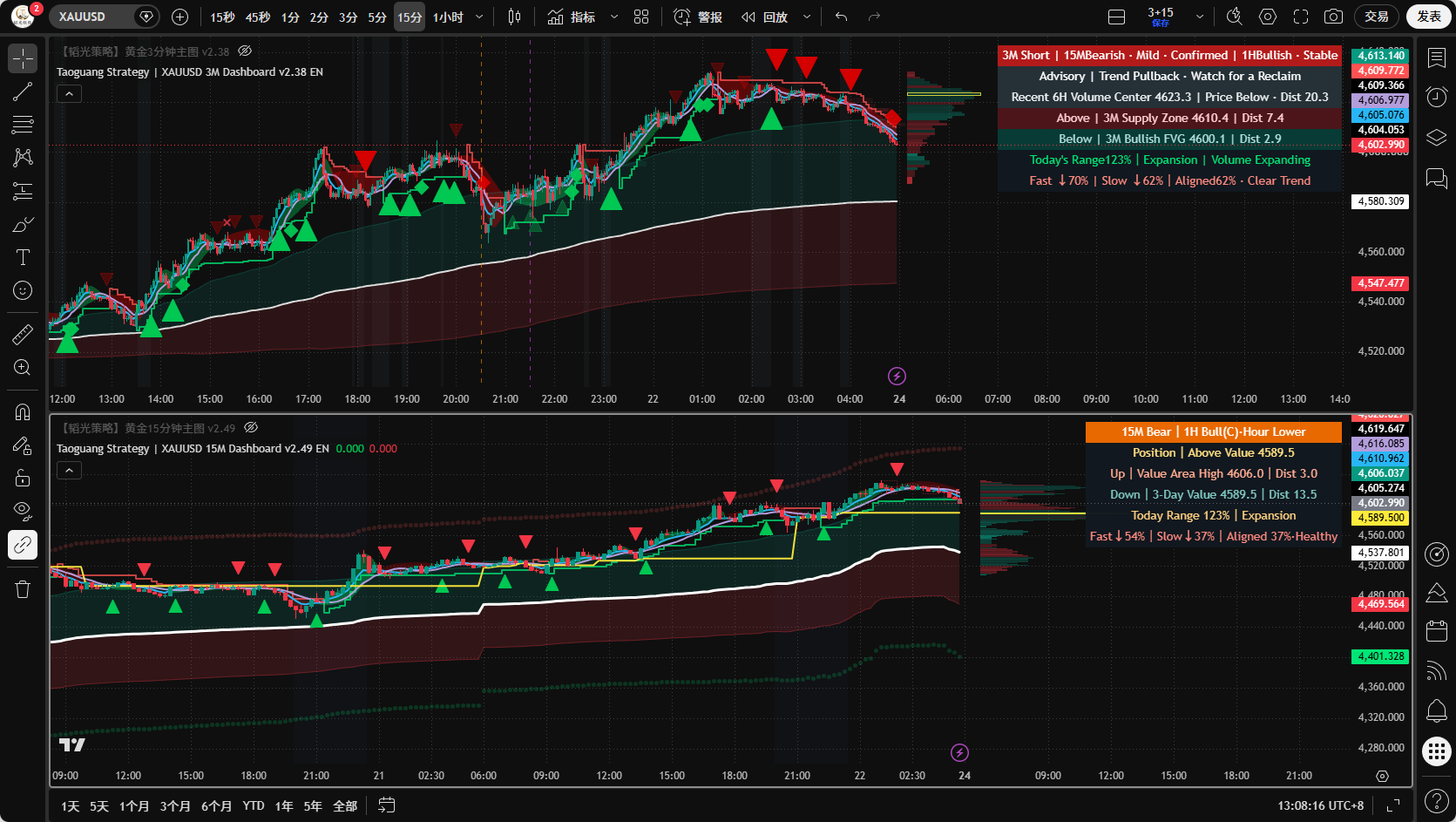
These are current English-version interfaces. View each timeframe separately or see how the two-window layout works together.
The 15-minute chart establishes direction, location and higher-timeframe context. The 3-minute chart then shows short-term rhythm. Each timeframe calculates independently.
RISK CONTEXT
“Risk-aware” means reducing common reading errors around noise, low range and timeframe conflict. It does not mean loss prevention.
Use the 15-minute view for direction and location before reading 3-minute rhythm, so a short move is not mistaken for a full trend.
Open candles can change. Confirmed direction uses closed-bar information to reduce intrabar reversals and premature interpretation.
Low range filters noise. After expansion, the system waits for a pullback, stabilization or structural recovery instead of treating every change as an opportunity.
Fixed targets and stop displays were removed to reduce the chance that analytical references are mistaken for mandatory trade instructions.
Technical analysis can be wrong and cannot predict unexpected news. Taoguang organizes chart information; it does not provide personalized analysis, investment advice, position sizing, account management or any return guarantee.
USER FEEDBACK
Different users value different things: a more consistent reading order, a less crowded chart, clearer product boundaries or safer account authorization.
“I used to read the 15-minute and 3-minute charts separately. Now I start with direction and location, then check short-term rhythm. The order finally makes sense.”
“The top-right panel is where I spend most of my time. Direction, location, range and line condition are together, which makes review much faster.”
“I no longer treat every triangle as something I must act on. The 15-minute context helps me distinguish a simple observation from a recovering short-term condition.”
“I used to look for a setup even in flat conditions. A low-range or unclear-direction state now gives me a reason to wait instead of forcing a decision.”
“The trial shows the complete product, not a reduced interface. I could first decide whether I understood the workflow before thinking about a subscription.”
“Removing fixed targets, stops and dense labels made the chart much easier to read. The important parts stand out without turning the screen into a wall of text.”
“Intrabar movement used to pull me in different directions. Knowing which states need a bar close means I may not be first, but my reading is steadier.”
“The two indicators do not need to trigger on the same candle. Once that was clear, the workflow became natural: 15-minute context, 3-minute rhythm.”
“Nearby structure and volume center are more useful to me than another buy or sell arrow. At least I know where price is before making my own decision.”
“It is not automated trading and it does not decide for me. Anyone who already reads candles will adapt faster; complete beginners still need the basics.”
“I care whether a product is maintained. The update notes explain what actually changed instead of only showing a new version number.”
“An invite only needs my public TradingView username, never my password. Access ends automatically and there is no automatic charge.”
Names and avatars have been replaced for privacy. Individual experiences do not represent product performance or financial results.
LATEST UPDATE · 2026.08.21
This release makes each chart’s role easier to understand, stabilizes status descriptions and removes labels that could be misread as trading instructions.
Large-range handling is more adaptive, fast/slow line states are expressed plainly, and key structure, range and location are consolidated in the panel.
Pullback recovery and continuation are clearer, while short-lived slope jumps are reduced without removing timely trend feedback.
Dense text and fixed plan levels are removed. Direction clouds, averages, triangles, diamonds, key locations and volume distribution remain.
INTERNATIONAL ACCESS · COMING SOON
International subscriptions and USD payment are not open yet. The prices below are an advance reference only; no USD payment is currently being accepted.
Flexible access without a longer commitment
Equivalent to about $42 / month
$25 less than monthly billingEquivalent to about $35 / month
$175 less than monthly billingWhen international access opens, every period will include the complete 15M and 3M systems, authorization, setup documentation, product troubleshooting and updates during the active term. One TradingView account may be bound at a time.
FAQ & BOUNDARIES
Availability, product limits, confirmation behavior and risk are stated plainly here.
The English product interface is ready, but public overseas subscriptions and USD payment are not open yet. Follow the website or contact @taoguangsoft on Telegram for release updates. Do not send payment in advance.
Yes. Every technical tool encounters unfavorable conditions. Taoguang can identify low range, conflict and uncertainty, but it cannot remove all false signals or predict unexpected news.
Sometimes. That is the tradeoff of close-based confirmation. The goal is not to capture every extreme, but to reduce premature readings caused by a still-forming candle.
An open candle continues to change, so its price, volume and observation state may also change. Confirmed direction uses closed-bar information; confirmed historical states are not rewritten by later market action.
Basic setup is possible, but you should know how to open a chart, change timeframes and add an indicator. Taoguang provides authorization and product documentation, not beginner trading education.
No. The software cannot control market conditions, execution, position size, discipline or user decisions. Screenshots and user feedback explain how the product is used and do not promise comparable results.
INTERNATIONAL RELEASE CONTACT
USD payment and public international subscriptions are not open. Contact the official Telegram account or email xifeng@taoguangsoft.cn for release updates; never send payment or account credentials to an unverified contact.
Use @taoguangsoft, or email xifeng@taoguangsoft.cn.
International payment and access details will be published when ready.
Never send a TradingView password, broker login, bank card or API key.